ROS Workspace
Package structure
Section titled “Package structure”All ROS 2 packages live in the robot-sim/ directory. Every directory containing a package.xml is a package.
Robot packages
Section titled “Robot packages”Each robot has two packages, generated by genbot:
<robot>_description — the robot model
urdf/<robot>.urdf— geometry URDF (positions, links, joints, mesh references)urdf/<robot>_control.urdf.xacro—ros2_controlhardware interface block (joints, command/state interfaces)meshes/— STL mesh files from OnShape- Built with
ament_cmake—CMakeLists.txtinstalls URDFs and meshes to the share directory
<robot>_bringup — launch configuration
launch/<robot>.launch.py— orchestrates the full simulation startupconfig/<robot>.controller.yaml— controller manager config (joints, update rate, controller types)config/<robot>.rviz— RViz visualization layout- Built with
ament_cmake
Shared packages
Section titled “Shared packages”sim_common — shared Python utilities
launch_utils.py— helper functions for launch files (get_asset()resolves paths in package share directories)move_joints.py— ROS 2 node for sending one-shot joint trajectory commandsjoint_gui.py— Tkinter GUI for interactive joint control- Built with
ament_python(setup.py+setup.cfg) - Registers
move_jointsandjoint_guias console script entry points
sim_worlds — Gazebo world files
worlds/empty.world.sdf— default world with physics, lighting, and a ground planegui/gui.config— Gazebo GUI plugin layout- Built with
ament_cmake
Building
Section titled “Building”The launch_sim.sh script handles building automatically. To build manually:
cd robot-simcolcon build --packages-up-to arm_bringup arm_description sim_worlds sim_common \ --cmake-args -DBUILD_TESTING=OFFsource install/setup.bash--packages-up-to ensures all dependencies are resolved and built in the correct order. The install/setup.bash overlay lets ROS 2 find the built packages.
Build outputs
Section titled “Build outputs”After building, robot-sim/ contains three generated directories:
| Directory | Contents |
|---|---|
build/ | Intermediate build artifacts |
install/ | Installed packages (what ROS 2 uses at runtime) |
log/ | Build logs |
All three are gitignored. Run ./scripts/clean_build.sh to delete them.
Adding or modifying packages
Section titled “Adding or modifying packages”When you add or change a package:
-
package.xml— declares the package name, version, description, and dependencies.colconuses the<depend>,<build_depend>, and<exec_depend>tags to determine build order. -
CMakeLists.txt(CMake packages) — defines what gets installed to the share directory. Typically installs URDFs, meshes, configs, and launch files. -
setup.py(Python packages) — lists Python modules and console script entry points.
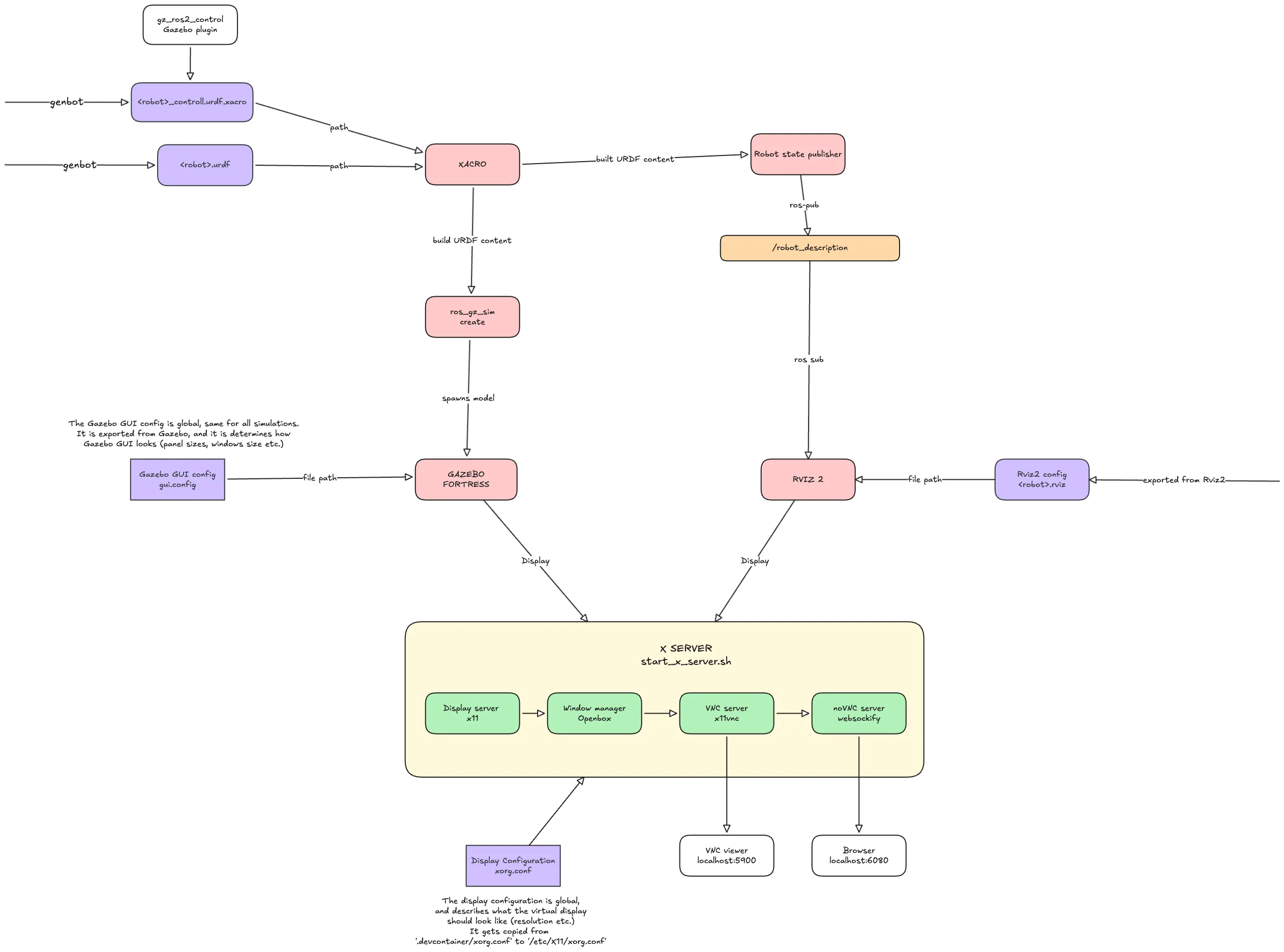
System flowchart
Section titled “System flowchart”Here is a flowchart showing how the arm simulation works end-to-end:
Troubleshooting
Section titled “Troubleshooting”Unexplained build errors: Run ./scripts/clean_build.sh and rebuild. This fixes the majority of mysterious failures.
Package not found at runtime: Make sure you sourced the workspace (source install/setup.bash). Opening a new terminal in VS Code doesn’t automatically source it.
Dependency order issues: Check that all <depend> tags in package.xml are correct. Missing dependencies cause packages to build before their dependencies are ready.